# User Registration
# Add Users
Clients may be added to the application in two ways: through signing up or manually added. Only administrators can manually add users to RAXWireless CRM.
# Sign Up
A client can sign up to the application by following these steps:
- Go to http://my.RAXWireless.com/ (opens new window).
- On the login page, click Sign Up.
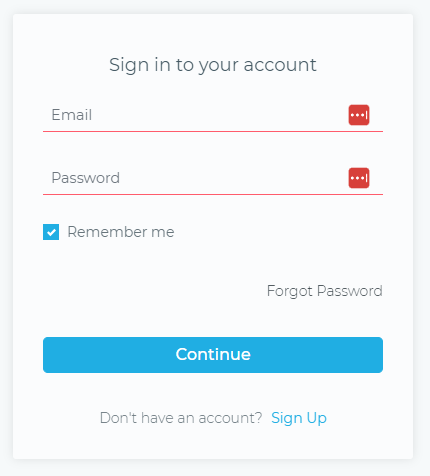
Figure 1. On the RAXWireless CRM login page, click Sign Up.
- In the Create New Account page, enter the following information:
- First Name. Enter your first name.
- Last Name. Enter your last name.
- Company Name. Enter your company name.
- Email. Enter your email address.
- Mobile. Enter your mobile number.
- Password. Enter your password with a minimum of 6 characters.
- Confirm Password. Re-enter your password.
- Click Sign up.
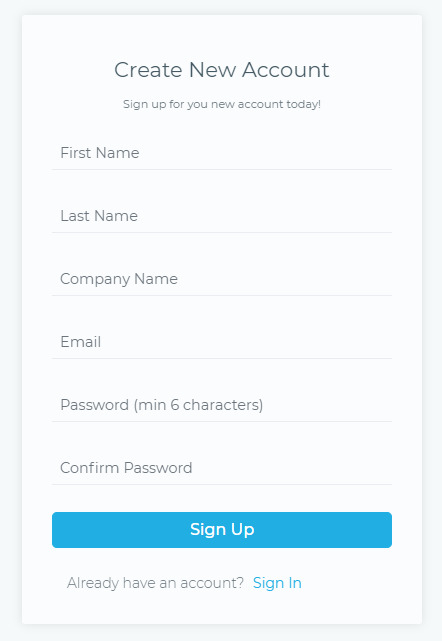
Figure 2. On the RAXWireless CRM login page, fill out the necessary information and then click Sign Up.
# Manually Added
Administrators can also create client accounts manually. During onboarding, the client will receive an invitation email with their default login credentials to access their RAXWireless CRM account.

Figure 3. A sample invitation email